TryHackMe: Detecting Web DDoS

Hej there, this is my first walkthrough for THM. Hope it helps!
1. Introduction
Denial-of-Service (DoS) attacks can take many forms, but their ultimate aim is to disrupt or completely block access to a website or web service. In this room, you will explore how DoS and DDoS attacks target the application layer, the techniques behind them, and how you, as a defender, can detect and mitigate these common threats.
Objectives
- Learn how denial-of-service attacks function
- Understand attacker motives behind disruptive attacks
- See how web logs can reveal signs of DoS and DDoS
- Practice analyzing denial-of-service attacks through log analysis
- Discover detection and mitigation techniques defenders can use
Prerequisites
Setup virtual environment
I understand the learning objectives and am ready to embark on a Denial-of-Service adventure! Answer:
No answer needed
2. DoS and DDoS Attacks
At their core, Denial-of-Service (DoS) attacks are meant to overwhelm a website or app so that people can’t use it. When this happens, customers can’t log in, shop, or access services, and businesses lose money and trust.
Have you ever tried to visit your favorite website, only to watch it endlessly load or force you through repeated CAPTCHA challenges? That site might have been facing a denial-of-service attack, where attackers flood it with excessive traffic, forcing defenders to scramble to maintain availability.
Denial-of-Service (DoS)

Any DoS attack is considered successful if it prevents a web service from functioning as intended. Let’s begin by looking at how even a simple, targeted attack can cause a website to become unavailable.
Imagine your website, a popular e-commerce site that sells bicycle parts, has a search form. This form takes user input, queries the database, and returns matching results. If the application fails to validate or handle the input properly, an attacker could submit unexpected or malformed data that causes the application to hang or crash while processing the request. In this way, a simple search box can be abused to launch a denial-of-service attack. An attacker could also flood the same search form with many requests or even a single, massive request to cause a DoS outage if the form does not properly filter or validate the search.
Distributed Denial-of-Service (DDoS)

The limitation of a basic DoS attack is that it relies on a single machine and a single internet connection. While one computer can generate many requests, its impact is capped by its CPU, memory, bandwidth, and network.
To scale up, attackers turn to Distributed Denial-of-Service (DDoS) attacks and utilize botnets, an army of compromised devices under their control. The computers, IoT devices, and even servers are often infected with malware and secretly controlled by the attacker. When instructed, the bots flood the target website or web application with traffic, overwhelming it much more effectively than a single machine could.
Now imagine your bicycle parts website. It is popular and handles steady traffic daily, but it wasn’t designed to withstand millions of requests in a short period of time. An attacker instructs their botnet to swarm your site, and the sudden influx of traffic quickly exhausts your resources, bringing the website down.
Types of Denial-of-Service Attacks Let’s examine a variety of denial-of-service attack types. These attacks can be carried out by a single attacker (DoS) or distributed across a botnet (DDoS).
Types of DoS attacks
| Attack Type | Description |
|---|---|
| Slowloris | Sending partial HTTP requests to tie up resources |
| HTTP Flood | Large number of HTTP requests |
| Cache Bypass | Forcing origin server responses |
| Oversized Query | Resource-intensive queries |
| Login/Form Abuse | Overloading authentication logic |
| Faulty Input Validation | Exploiting poor input handling |
What class of attack relies on disrupting availability? Answer:
Denial-of-Service
What do we call the network of compromised machines? Answer:
Botnet
3. Attack Motives

Now that you have learned how attackers launch DoS and DDoS attacks, let’s look at why they do it. At first glance, a short web service outage may seem minor, but for organizations that depend on constant availability, the consequences can be severe, leading to lost income, frustrated users, and reputational damage.
| Motive | Description | Example |
|---|---|---|
| Financial Loss | Stop revenue | Attack during peak sales |
| Extortion | Demand ransom | Bank DDoS threat |
| Hacktivism | Political protest | Government sites attacked |
| Distraction | Hide other attacks | Cover intrusion |
| Competition | Harm rivals | Attack during launch |
| Denial of Wallet | Increase cloud costs | Excess API calls |
| Reputational Damage | Loss of trust | Game server outages |
Note: This is not an exhaustive list of attacker motives. Depending on their resources and target, attackers can combine multiple objectives or pursue others.
In the Wild On New Year’s Eve 2015, the BBC was the victim of a DDoS attack that took its website offline. The site’s readers could not access articles for several hours as their requests timed out or returned internal error messages. The group that claimed responsibility, New World Hacking, says it carried out the DDoS simply as a test of its capabilities.
In 2023, Microsoft experienced a large-scale layer 7 DDoS attack that caused Azure, OneDrive, and Outlook outages. The hacktivist group Anonymous Sudan claimed responsibility. The attackers used techniques such as HTTP flooding and Slowloris to overwhelm web servers, causing major disruptions for Microsoft customers around the world.
Which motive aims to damage reputation? Answer:
Reputational Damage
Which motive drove the Microsoft attack? Answer:
Hacktivism
4. Log Analysis
Web server logs are a valuable source of evidence when investigating denial-of-service attacks. Every major web service, whether Apache, NGINX, or Microsoft IIS, records web requests in a somewhat standardized log format. By examining these logs, analysts and responders can uncover patterns that help distinguish between normal user traffic and malicious activity. In this task, we will look at some key indicators of a potential DoS and DDoS attack, and highlight the strengths and limitations of relying on logs for detection.
From the previous tasks, we know that denial-of-service attacks often rely on sending a flood of HTTP requests to the target, but can also utilize individually specially crafted web requests to halt a service.
Take a look at the indicators below:
| Indicator | Example | Description |
|---|---|---|
| High Request Rate | 1000 requests | Resource exhaustion |
| Odd User Agents | curl requests | Automated attacks |
| Geographic anomalies | Global IPs | Botnet traffic |
| Burst timestamps | Sudden spikes | Automation indicator |
| Server errors | 503 spikes | Service overwhelmed |
| Logic abuse | Large queries | Resource exhaustion |
Analysts should look for multiple, layered signals forming a picture of a DDoS attempt. For example, imagine an attacker controlling a worldwide botnet aimed at a single site. You might see requests from a wide range of IP addresses across different geographic regions. These requests could hammer several resource-intensive endpoints with the same User-Agent string or a variety to appear more legitimate. Maintaining a watchlist of common indicators to be on the lookout for can be a valuable tool in an analyst’s arsenal.
Targeted Resources
If an attacker aims to disrupt a web service like we’ve discussed, they will likely focus on endpoints that consume the most server resources per request or are most critical to maintain site functionality. Pages like /login or search forms are prime targets because each request forces the server to query a database, validate input, and return results. This makes the requests far more expensive to process than static content like product pages or images.
Commonly targeted endpoints and reasoning: /login - involves authentication processes /search - requires complex database queries /api endpoints - critical for dynamic content delivery /register or /signup - requires database writes and validation /contact or /feedback - requires database entries and can trigger email notifications /cart or /checkout - requires session management, inventory checks, and payment processing
Log Sample
Let’s examine a sample condensed access log to see how a DoS attack might appear in a post-incident scenario.
Normal User Traffic - Every few seconds, a user requests a page and receives a response as expected DoS Attack - Beginning at 10:01:10, you can see the IP address 203.0.113.55 begin to send repeated GET requests to /login.php Web Server Down - Users are requesting pages and receiving 503 responses indicating the service is unavailable
Hands On
Your bicycle parts website has undergone a denial-of-service attack. Open up the access.log file on the user’s Desktop to begin your investigation. The logs include a mix of normal user-generated traffic and attacker traffic. While you comb the logs, be on the lookout for repeated requests to the same page and remember the indicators you learned about in this task. Best of luck!
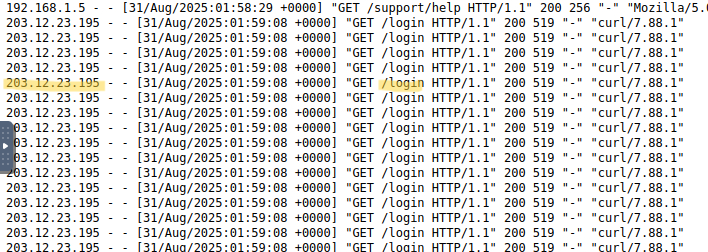
What is the attacker’s IP address?
203.12.23.195
Which page is repeatedly targeted by the attacker’s requests? /login
After the attack, what error code do legitimate users receive? 503
5. Leveraging SIEMs
Securing Information and Event Management (SIEM) platforms make log analysis far more efficient by providing the ability to combine multiple log sources and query for useful fields. Instead of scrolling through endless raw entries in a log file, you can filter and sort logs by IP address, user agent, or response code. This ability makes identifying patterns in traffic much easier.
In the screenshot below, you can see a timechart created in Splunk based on all requests to a server over a period of ten minutes.
Normal User Requests - A few requests to various pages every minute DoS Attack - 1,000 requests to /login.php within a one-minute timeframe Requested Pages

Looking over the same requests but filtering by the user agent (useragent) and IP address (clientip) fields enables you to see more details about where the requests originated.

Hands On
This time, your website experienced a suspected DDoS attack. You’ll use Splunk to investigate what happened!
Open the Splunk instance using the shortcut on the Desktop, or access it directly at http://10.10.40.78:8000
During this exercise, you’ll analyze web access logs collected during the suspected attack period. These logs contain a mix of normal user traffic and potentially malicious requests. To begin, open the Search & Reporting app in Splunk and run a search in the main index: index=”main”. On the left side of the GUI, you will see the fields that have been extracted from the log file. These will prove to be very useful as you investigate.
Questions: Open Splunk and enter index=”main” in the search field
What was the most frequently requested uri? Click on uri - the top value is /search
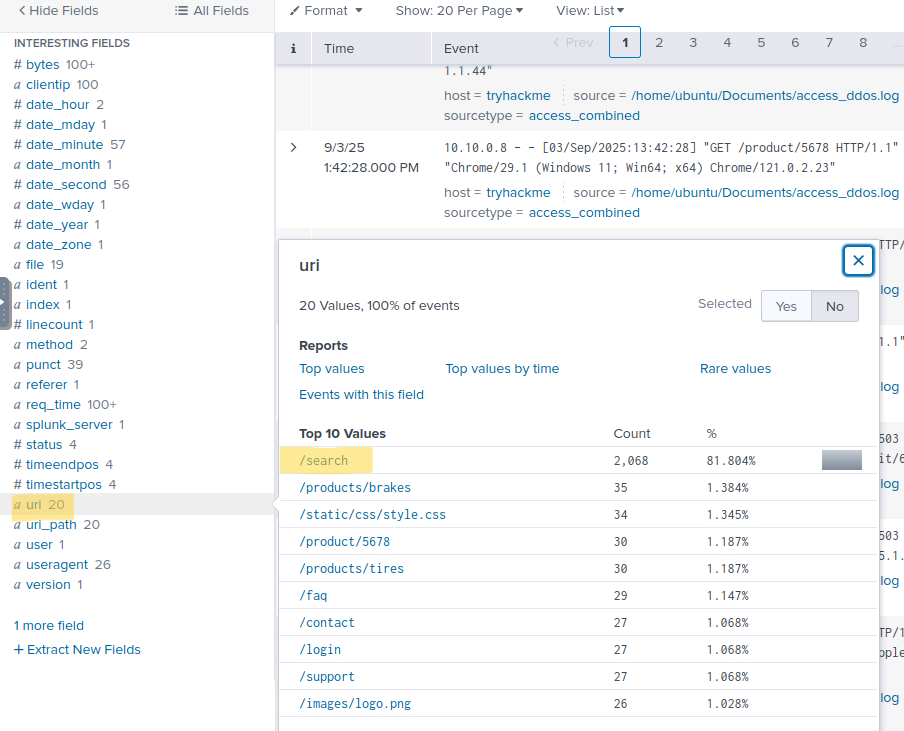
Which clientip made the most requests to the target uri? Click on clientip - the top value is 203.0.113.7
How many IP addresses were part of the botnet that attacked your website? We know that the attacker IPs start with 203.xx.xx.xx -type: index=”main” clientip=”203*“ in the search bar and look at clientip 60 Which useragent was most commonly used by the attacking traffic? Click on useragent the top value is Java/1.8.0_181
Use the timechart command to visualize the requests. What is the peak number of requests made per second during the attack? Type: index=”main” | timechart span=1s count by 203.0.113.7 in the search bar and the click on Visualization. Hovering over the on peak result will show the answer: 207
Which legitimate (non-attacking) clientip received the first 503 response status post-attack? Type: index=”main” AND status=”503” AND clientip=10* - I went to the last page of the entrys which shows the earlier entrys and bam: 10.10.0.27
6. Defense
Attackers constantly look for weak points to exploit, but defenders have various tools and methods to keep systems resilient. In this task, we will examine prevention and mitigation strategies available to ensure our websites and web apps are as protected as possible from denial-of-service attacks.<
Application Level Defense Secure Development Practices A secure site starts with secure code. Search fields and forms must validate input so they can’t be abused. Think of a search form like a librarian who looks up books on request. If the librarian has clear rules, like “only search for titles under 50 characters”, they can respond quickly. Without rules in place, someone could ask the librarian to search for an overly long or strange title with special characters, slowing them down and delaying everyone else’s requests. In the same way, web applications need input validation to stop attackers from submitting specialized queries aimed at overloading the system.
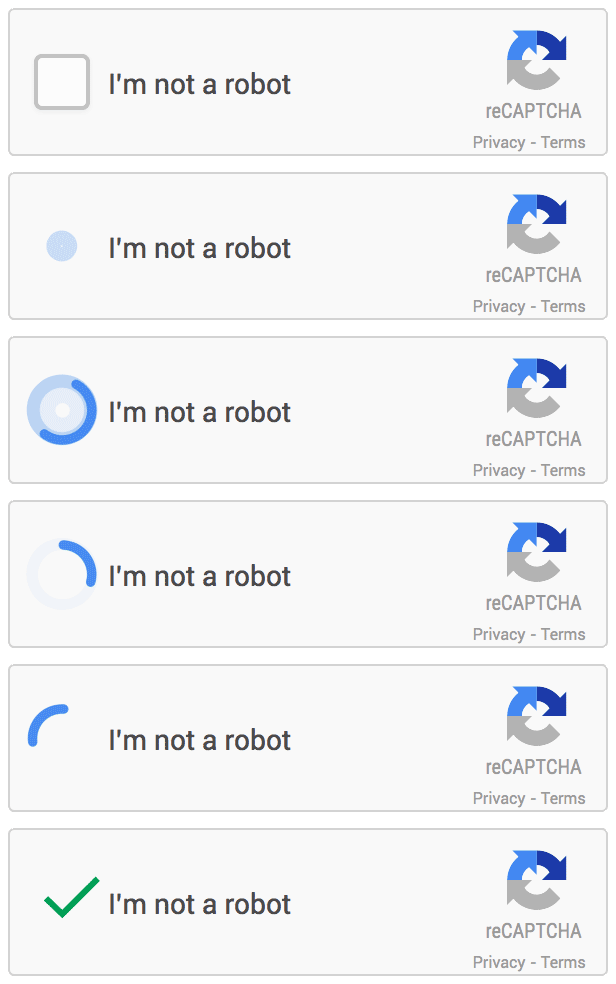
Challenges One way to stop automated traffic is to require a challenge before granting access. This could be a CAPTCHA, where the user solves a puzzle, like clicking images or checking a box. For humans, it’s a small step, but for bots, it can block or slow down an attack. Websites can also use JavaScript challenges, which run quietly in the background to confirm if a visitor is a real user or automated traffic. Legitimate users usually don’t notice them, but automated tools and botnets often fail, making these challenges an effective filter against malicious traffic.
Network and Infrastructure Defenses
Content Delivery Network (CDN) CDNs help manage server load by caching and serving content from edge servers closest to users. This reduces latency and allows the origin server to handle only a fraction of requests, while the CDN serves the majority. As a result, CDNs take on much of the burden of mitigating DDoS attacks. They also provide load-balancing to distribute traffic across servers, ensuring no single server is overloaded and rerouting requests if one becomes unavailable.
Here’s an example of a 16 TB DDoS attack displayed in the Cloudflare CDN dashboard.
Total bandwidth over a 30-day period - This shows the entire traffic volume over the last 30 days. If your site normally sees a few hundred gigabytes a month, suddenly seeing 16 TB indicates something is abnormal. Total cached bandwidth by CDN edge servers - This represents how much traffic was successfully delivered by the CDN’s edge servers. Nearly all of the bandwidth being cached indicates that Cloudflare absorbed the attack traffic before it could overwhelm the backend. Traffic spike from DDoS attack - The spike in the graph is the signature of the DDoS attack. Without a CDN, the flood of requests would have hit the origin server.

Beyond absorbing traffic, CDNs also provide analysts with powerful visibility, including helpful visuals and diagnostics of website traffic. This lets you quickly break down requests by geographic location, volume, and source patterns, helping distinguish malicious traffic from legitimate users.

Web Application Firewall (WAF) CDNs typically integrate WAFs in an effort to shield their customers’ servers. They inspect incoming traffic and either allow, challenge, or block requests. WAFs work off of rules that integrate known attack indicators and threat intelligence. Modern WAF solutions are already very good at mitigating DoS and DDoS attacks because they know what to look out for. Custom rules can also be developed to assist in defending against targeted threats. For example, you might implement a rate-limiting firewall rule that limits requests to /login.php to five per minute. If the originating IP requests the page more than five times, it would be blocked from making future requests for a period of time or provided with a challenge to prove it is a human-made request.
Large-Scale Mitigation Modern defense solutions can block denial-of-service attacks and also leverage their vast distributed infrastructure to absorb and balance large volumes of traffic. In 2023, Google mitigated a large-scale DDoS that peaked at 398 million requests per second. Cloudflare claims to have mitigated the largest DDoS ever recorded, which peaked at 11.5 Tbps and lasted only 35 seconds. These examples demonstrate how providers use global networks and traffic filtering to keep even the largest attacks from taking critical services offline.
Bypassing Security Measures While CDNs, caching, and WAFs provide strong protection, attackers often attempt to bypass these defenses. One technique is appending random query parameters. Your CDN might serve a cached URL at /products, but if an attacker appends the query with a random string like /products?a=abcd, your CDN cannot serve the cached page, and the origin server is forced to respond. Similarly, changing user agents, spoofing referrer pages, or launching requests from diverse geographic regions can help attackers evade WAF filtering rules.
Questions
What type of security challenge blocks bots by asking users to solve a simple puzzle? Answer:
CAPTCHA
Which CDN feature spreads traffic across multiple servers to prevent overload? Answer:
Load-balancing
7. Conclusion
In this room, you explored different types of Denial-of-Service attacks, how they work, and the motives behind them, supported by some real-world examples. You practiced identifying DoS and DDoS activity in web server logs by analyzing common indicators and learned how SIEM platforms help analysts investigate and manage large volumes of traffic. Through a hands-on Splunk exercise, you uncovered evidence of a DDoS attack. Finally, you examined how CDNs and WAFs can help defend websites and applications against these attacks. Question: Complete the room and continue on your cyber learning journey! No answer needed
That’s it folks! Thanks for passing by! Keep learning!