Virtual Pentesting Lab
Personal penetration testing lab built with VirtualBox for practicing exploitation and network attacks
Overview
This project documents the setup of my personal penetration testing lab using VirtualBox.
The lab provides a safe and controlled environment where attacks and defensive techniques can be tested without impacting real systems.
Lab Goals
The goal of this environment is to simulate a small enterprise-style network for practicing penetration testing techniques in a safe and isolated setup.
The lab includes:
- an attacker machine (Kali Linux)
- vulnerable Linux targets
- containerized web applications
- a Windows Server for future Active Directory testing
Lab Architecture
The lab runs on a Windows host system using VirtualBox and consists of multiple virtual machines connected through an isolated internal network.
LAB_NET 192.168.56.0/24

Kali Linux (Attacker)
│ 192.168.56.10
│
├── Ubuntu Server (Docker Lab Host)
│ 192.168.56.20
│
├── Metasploitable2 (Vulnerable Linux Target)
│ 192.168.56.30
│
├── Windows Server 2019 (Domain Controller - future)
│ 192.168.56.40
│
└── Windows 11 (Client)
 192.168.56.50
Technologies Used
The following technologies are used to build the lab environment:
- VirtualBox
- Kali Linux
- Ubuntu Server
- Metasploitable2
- Windows Server 2019
- Windows 11
Network Configuration
All machines are connected to an isolated VirtualBox internal network called LAB_NET.
| Machine | IP Address | Role |
|---|---|---|
| Kali Linux | 192.168.56.10 | Attacker |
| Ubuntu Server | 192.168.56.20 | Docker Lab Host |
| Metasploitable2 | 192.168.56.30 | Vulnerable Linux Target |
| Windows Server | 192.168.56.40 | Domain Controller (future) |
| [NEW] Windows 11 | 192.168.56.50 | Client |
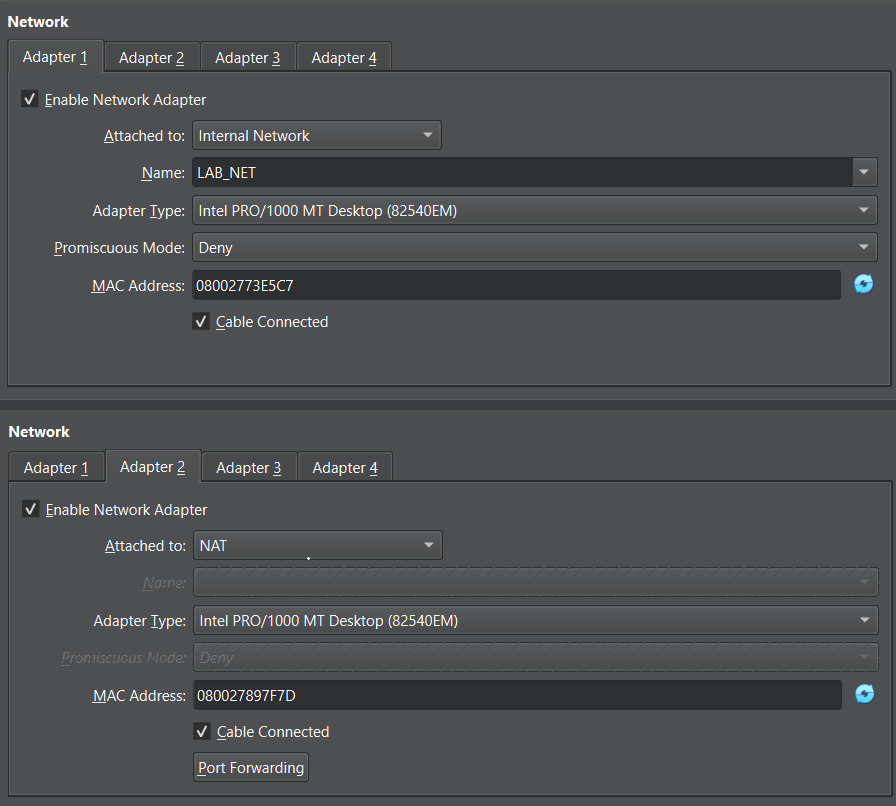
Network configuration for Kali Linux.
Lab Services (Docker Host)
The Ubuntu Server VM acts as a container host for intentionally vulnerable web applications used during pentesting practice.
Because Ubuntu Server runs without a graphical interface, applications are hosted as web services and accessed remotely from the attacker machine.
Kali Linux (attacker)
│
│ HTTP requests
│
Ubuntu Server (Docker Host)
│
├─ OWASP Juice Shop
├─ DVWA
├─ WebGoat
└─ other vulnerable apps
Example for running the OWASP Juice Shop: Running in Ubuntu Server:
docker run -d -p 3000:3000 bkimminich/juice-shopThen access from a browser in Kali Linux:
http://192.168.56.20:3000Example Test
After setting up the environment, network connectivity and services can be tested from the Kali attacker machine.
Example scan from Kali Linux: 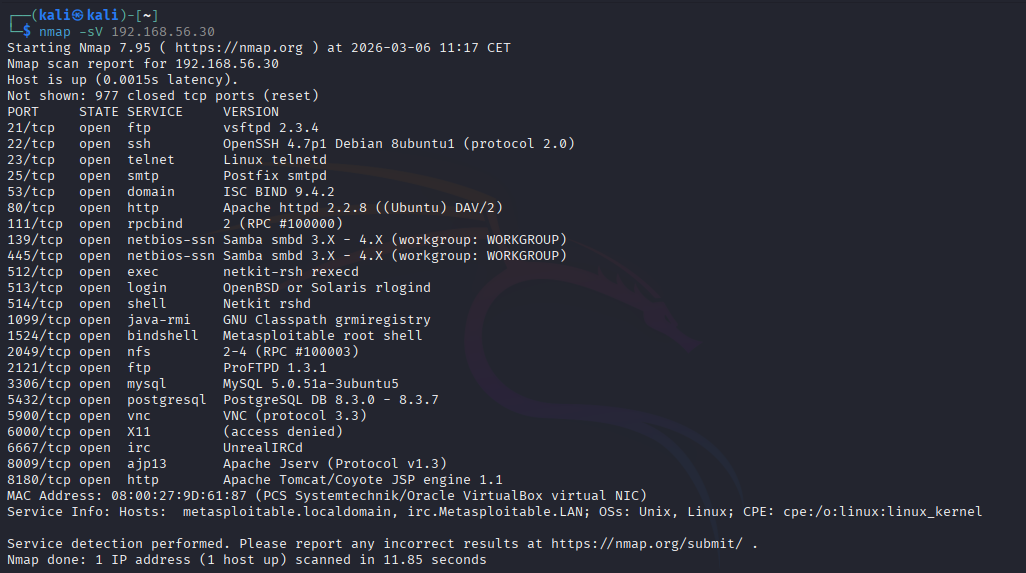
The scan reveals intentionally vulnerable services running on the Metasploitable machine.
This allows safe exploitation practice and vulnerability analysis.
Future Improvements
Planned expansions for the lab include:
- Active Directory domain setup
- Windows client machine
- Vulnerable Docker applications
Troubleshooting & Lessons Learned
Windows Server not responding to ping
Problem: The Windows Server VM could not be reached from Kali or Ubuntu.
Cause: The Windows network profile was set to Public, which blocks ICMP requests in Windows Defender Firewall.
Solution: Changed the network profile to Private and allowed ICMP:
New-NetFirewallRule -DisplayName "Allow ICMPv4-In" -Protocol ICMPv4What I learned: Windows firewall behavior depends on the network profile. Public networks block most inbound traffic by default.