Vulnerability Management Lab
Setting up a lab for vulnerability scans on a target system
Overview
This project was planned in collaboration with Lionel Sango (@Lionel), who focused on the vulnerability management workflow, including asset inventory, vulnerability assessment, remediation, and validation rescans. My role focused on designing, deploying, and maintaining the scanner infrastructure used to support the project. The original goal was to build a distributed vulnerability scanning environment where the scanner and target systems were hosted in separate locations. To achieve this, Greenbone Community Edition (OpenVAS) was deployed in Docker containers on an Ubuntu Server virtual machine, while Tailscale provided secure connectivity between the scanner environment and the remote target network. Although the final vulnerability assessments were ultimately performed from a scanner located within the target environment, the project provided valuable experience in deploying enterprise vulnerability management infrastructure, troubleshooting Docker-based security tools, and designing secure remote connectivity solutions.
Have a look at Lionel’s documentation!
Objectives
The infrastructure component of the project focused on:
- Deploying Greenbone Community Edition using Docker
- Building a dedicated scanner appliance on Ubuntu Server
- Configuring secure remote connectivity using Tailscale
- Validating remote access to target systems
- Testing vulnerability scanning workflows Later:
- Comparing scanner behaviour between Greenbone and Nessus
- Documenting challenges encountered in distributed scanning environments
Environment
Scanner Environment
- Kali Linux (Management Workstation)
- Ubuntu Server 26.04 LTS
- Docker Engine & Docker Compose
- Greenbone Community Edition (OpenVAS)
- Tailscale
Test Targets
- Ubuntu Server (local validation target)
- Remote Windows Server 2022
- Remote Windows 11 Pro
- Remote Metasploitable 2
Architecture Design
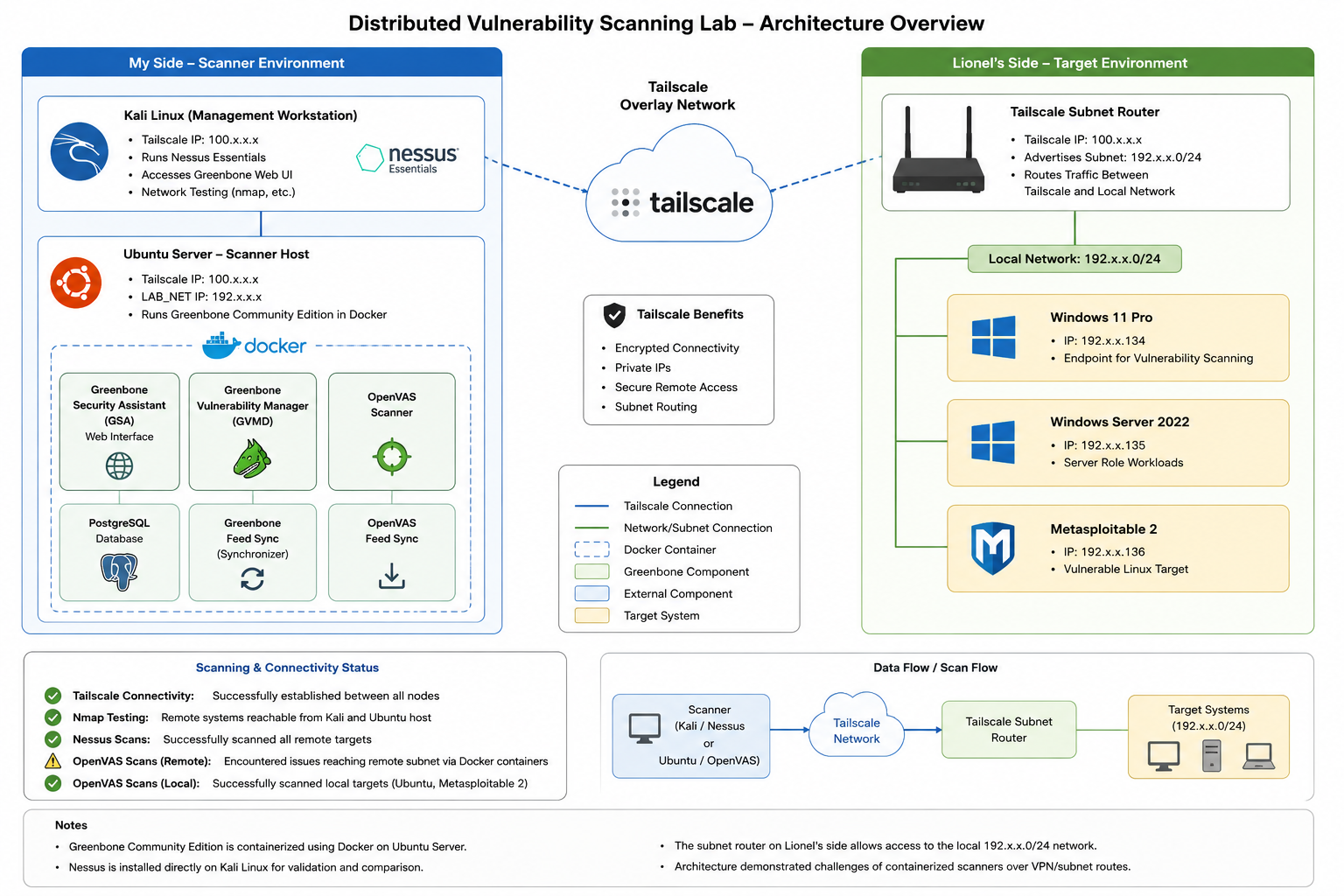
The planned architecture separated the scanner and target environments across two physical locations. Tailscale was used to establish secure connectivity between both environments, allowing the scanner to reach systems hosted remotely through subnet routing. The Greenbone web interface was managed from Kali Linux while the scanner itself operated on a dedicated Ubuntu Server virtual machine.
1
2
3
4
5
6
7
8
9
10
11
12
13
14
15
16
17
18
19
20
21
22
23
24
25
26
27
28
29
30
31
32
33
34
35
36
37
38
39
40
41
42
43
44
45
46
47
48
49
50
51
52
53
54
55
56
57
58
59
60
61
62
63
64
65
66
67
68
69
70
71
72
73
74
75
76
77
78
79
80
81
82
83
84
85
86
┌─────────────────────────┐
│      Scanner Side       │
│       (Anne)            │
└─────────────────────────┘

┌──────────────────────┐
│ Kali Linux           │
│                      │
│ • Nessus Essentials  │
│ • Nmap / RustScan    │
│ • Greenbone Web UI   │
│ • Tailscale          │
│   100.75.120.41      │
└──────────┬───────────┘
│
│ Management
▼

┌─────────────────────────────────────────────┐
│ Ubuntu Server 26.04 LTS                     │
│                                             │
│ Tailscale: 100.90.58.124                    │
│ Internal IP : 192.168.56.20                 │
│                                             │
│ Docker                                      │
│ ├─ Greenbone Security Assistant (GSA)       │
│ ├─ Greenbone Vulnerability Manager (GVMD)   │
│ ├─ OpenVAS Scanner                          │
│ ├─ PostgreSQL Database                      │
│ └─ Feed Synchronization Services            │
└──────────┬──────────────────────────────────┘
│
│
▼

☁──────────────────────☁
│      Tailscale       │
│     100.x.x.x        │
☁──────────────────────☁
│
▼

┌─────────────────────────────────────────────┐
│ Target Side (Lionel)                        │
└─────────────────────────────────────────────┘

┌──────────────────────────────┐
│ Tailscale Subnet Router      │
│ 100.115.50.59                │
└──────────┬───────────────────┘
│
▼

Local Network
192.168.10.0/24

┌──────────────────────────────┐
│ Windows 11 Pro               │
│ 192.168.10.134               │
└──────────────────────────────┘

┌──────────────────────────────┐
│ Windows Server 2022          │
│ 192.168.10.135               │
└──────────────────────────────┘

┌──────────────────────────────┐
│ Metasploitable 2             │
│ 192.168.10.136               │
└──────────────────────────────┘


Validation Results
─────────────────────────────────────────────

✓ Tailscale connectivity established

✓ Remote hosts reachable with Nmap

✓ Nessus successfully scanned remote targets

✓ Greenbone successfully scanned local targets

⚠ Greenbone remote scans through Docker/Tailscale

Subnet routing did not behave as expected
Greenbone Deployment
The deployment included:
- PostgreSQL database
- Greenbone Vulnerability Manager (GVMD)
- OpenVAS Scanner
- Greenbone Security Assistant (Web Interface)
- Feed synchronization services
- Supporting data containers Once deployed, the web interface was successfully accessed from Kali Linux through the Tailscale-connected Ubuntu Server.
Challenges Encountered
Storage Planning
The initial Greenbone deployment failed due to insufficient storage capacity. During the first feed synchronization process, the scanner exhausted the available space on a 40 GB virtual disk, causing feed imports and database operations to fail. To resolve the issue:
- A new Ubuntu Server VM was deployed
- Virtual disk capacity was increased to 120 GB
- The scanner VM was migrated to SSD-backed storage
Feed Synchronization
The initial feed synchronization required significant storage and processing resources. Monitoring Docker containers, logs and system resources was necessary to verify that synchronization was progressing correctly.
Distributed Scanning
Connectivity testing between both environments was successful. Ping and Nmap scans performed across the Tailscale-connected network confirmed that remote systems were reachable and that subnet routing functioned correctly. However, Greenbone scans targeting systems behind the remote subnet router did not behave as expected. While Nessus successfully validated connectivity and completed scans against remote systems, Greenbone was still unable to consistently perform scans across the distributed architecture. This highlighted an important lesson about Docker-based security tooling: network visibility available to the host operating system does not always translate directly to containerized applications.
1
2
3
4
5
6
7
8
9
10
11
12
13
14
15
16
17
18
19
20
21
22
23
24
25
26
27
28
29
30
31
32
33
34
35
36
37
38
39
40
41
42
43
44
45
46
47
48
49
50
51
┌──(root㉿kali)-[/home/kali]
└─# nmap -sV -sC 192.168.10.135
Starting Nmap 7.99 ( https://nmap.org ) at 2026-06-05 13:55 +0200
Nmap scan report for 192.168.10.135
Host is up (0.030s latency).
Not shown: 827 filtered tcp ports (no-response), 168 closed tcp ports (reset)
PORT     STATE SERVICE       VERSION
135/tcp  open  msrpc         Microsoft Windows RPC
139/tcp  open  netbios-ssn   Microsoft Windows netbios-ssn
445/tcp  open  microsoft-ds  Windows Server 2022 Standard Evaluation 20348 microsoft-ds
3389/tcp open  ms-wbt-server Microsoft Terminal Services
| rdp-ntlm-info:
|   Target_Name: WIN-8C3GDUQBH3G
|   NetBIOS_Domain_Name: WIN-8C3GDUQBH3G
|   NetBIOS_Computer_Name: WIN-8C3GDUQBH3G
|   DNS_Domain_Name: WIN-8C3GDUQBH3G
|   DNS_Computer_Name: WIN-8C3GDUQBH3G
|   Product_Version: 10.0.20348
|_  System_Time: 2026-06-05T11:56:01+00:00
| ssl-cert: Subject: commonName=WIN-8C3GDUQBH3G
| Not valid before: 2026-06-02T22:08:26
|_Not valid after:  2026-12-02T22:08:26
|_ssl-date: 2026-06-05T11:56:15+00:00; 0s from scanner time.
5985/tcp open  http          Microsoft HTTPAPI httpd 2.0 (SSDP/UPnP)
|_http-title: Not Found
|_http-server-header: Microsoft-HTTPAPI/2.0
Service Info: OSs: Windows, Windows Server 2008 R2 - 2012; CPE: cpe:/o:microsoft:windows

Host script results:
| smb2-security-mode:
|   3.1.1:
|_    Message signing enabled but not required
| smb-security-mode:
|   account_used: guest
|   authentication_level: user
|   challenge_response: supported
|_  message_signing: disabled (dangerous, but default)
|_clock-skew: mean: 1h23m59s, deviation: 3h07m49s, median: 0s
| smb-os-discovery:
|   OS: Windows Server 2022 Standard Evaluation 20348 (Windows Server 2022 Standard Evaluation 6.3)
|   Computer name: WIN-8C3GDUQBH3G
|   NetBIOS computer name: WIN-8C3GDUQBH3G\x00
|   Workgroup: WORKGROUP\x00
|_  System time: 2026-06-05T04:56:01-07:00
|_nbstat: NetBIOS name: WIN-8C3GDUQBH3G, NetBIOS user: <unknown>, NetBIOS MAC: 00:0c:29:fb:2d:67 (VMware)
| smb2-time:
|   date: 2026-06-05T11:56:01
|_  start_date: N/A

Service detection performed. Please report any incorrect results at https://nmap.org/submit/ .
Nmap done: 1 IP address (1 host up) scanned in 34.49 seconds
example nmap scan for 192.168.10.135
Nessus Validation
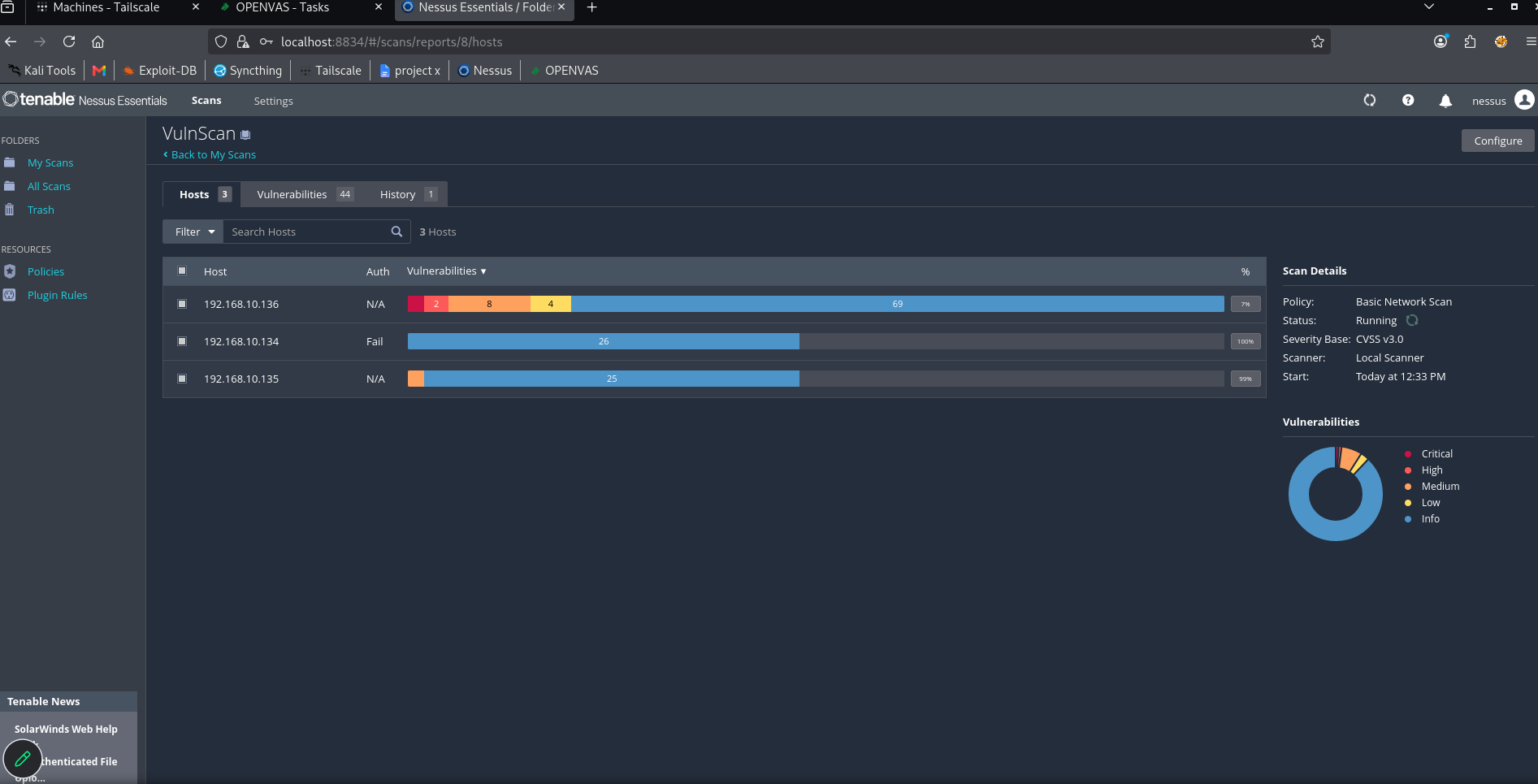
To validate connectivity independently of Greenbone, Nessus Essentials was deployed on the Kali Linux workstation. Nessus successfully identified and scanned remote targets across the Tailscale-connected environment, confirming that:
- Tailscale connectivity was operational
- Subnet routing was functioning correctly
- Remote systems were reachable from the scanner environment This comparison suggested that the Greenbone scanning issues were related to scanner configuration or container networking rather than the underlying network infrastructure.
Validation Testing
To confirm the functionality of the Greenbone deployment, scans were successfully executed against local targets, including:
- Ubuntu Server
- Metasploitable 2 These tests verified that the scanner platform itself was operational and capable of performing vulnerability assessments within networks directly accessible to the scanner host.
Lessons Learned
This project provided hands-on experience with:
- Docker-based security tool deployment
- Greenbone Community Edition administration
- Tailscale network integration
- Vulnerability scanner infrastructure design
- Scanner troubleshooting and validation
- Resource planning for security platforms
- Distributed scanning architecture
While the original distributed scanning approach encountered limitations, the project demonstrated the practical challenges that can arise when combining containerized security tools, VPN-based connectivity and remote network assessment. Understanding and troubleshooting these challenges proved to be just as valuable as the vulnerability assessments themselves.