Password Strength Checker (Python)
A Python CLI tool that evaluates password strength and checks passwords against a local common-password wordlist.
Overview
After building a password strength checker with HTML, CSS, and JavaScript, I wanted to create a Python version that feels more like a small security utility.
This project checks passwords based on length and character variety, but also compares them against a local wordlist of common passwords. That makes it a bit more practical than a checker that only looks for uppercase letters, numbers, or symbols.
Features
- Built in Python as a command-line tool
- Checks for minimum length, lowercase and uppercase letters, numbers and symbols
- Compares passwords against a local common-password wordlist
- Gives simple feedback and improvement suggestions
Why I built it
I wanted to build a second version of the password checker in Python because I wanted to include the possibility of comparing passwords to a local wordlist.
Instead of only checking whether a password looks complex I wanted to include the idea that a password can still be weak if it is common or reused.
Example Output
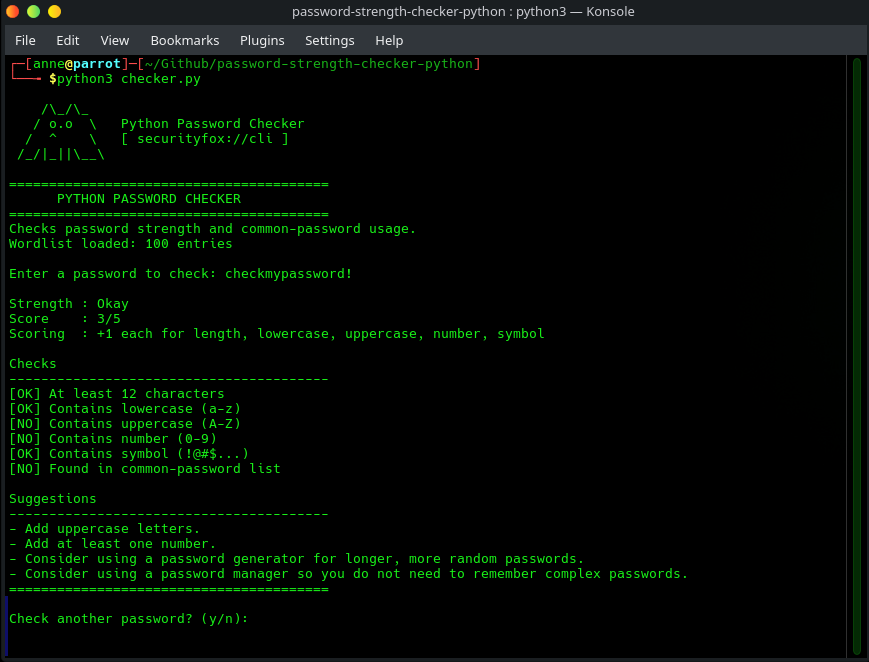 Password check
Snippets from the key code
Password evaluation (rules + score)
def evaluate_password(password: str, common_passwords: set[str]) -> dict:
"""Evaluate password strength and return detailed results."""
checks = {
  "length": len(password) >= 12,
  "lowercase": bool(re.search(r"[a-z]", password)),
  "uppercase": bool(re.search(r"[A-Z]", password)),
  "number": bool(re.search(r"[0-9]", password)),
  "symbol": bool(re.search(r"[^A-Za-z0-9]", password)),
  "common_password": password.casefold() in common_passwords,
}

score = 0
for key in ["length", "lowercase", "uppercase", "number", "symbol"]:
  if checks[key]:
    score += 1

    if checks["common_password"]:
      score = max(score - 2, 0)

      if checks["common_password"]:
        strength = "Weak"
        elif score <= 2:
        strength = "Weak"
        elif score == 3:
        strength = "Okay"
        elif score == 4:
        strength = "Strong"
        else:
          strength = "Very strong"

          return {
            "checks": checks,
            "score": score,
            "strength": strength,
          }
What I learned
This project was a nice way to practice Python with something small but still useful.
One part I liked was adding the local wordlist check, because it makes the tool more realistic than just checking for uppercase letters, numbers and symbols. A password can look “strong” at first glance and still be weak if it is common or predictable.
It was also a good reminder that even simple tools can become much more useful when they give clear feedback and are easy to adapt.
Links
🔗 View Source Code on Codeberg and try it yourself!
The script loads its passwords from a local wordlist file, so feel free to use other common-password or custom wordlists!